
Insight | 01.17.25
Insight | 03.26.25
By Brittany Lavy
UX design is all about creating experiences that are easy to use and feel natural. One of the design practices commonly used to improve how users interact with your site is by performing a UX Audit. Through this process, problem areas are identified that make users feel frustrated, confused, or leave before they complete their journey. The ultimate goal of a UX audit is to fix issues and create a smoother, more enjoyable experience.
Why a usability audit matters
A usability audit is the first step in spotting your users’ pain points, any bumps in their journey, and areas that could use some improvement on your site or digital product. Once we’ve done that, we can create a roadmap of areas to focus on and tweak to make sure your audience gets the best possible user experience.
Here are some ways UX audits can help improve your product:
Usability problems throughout the product
If users get stuck, lost, or frustrated, they won’t stick around. Definitely not what you want! This step helps ensure users reach their intended destination—both where they need to go and where you want them to go.
We find usability problems by using well-known guidelines called the 10 Heuristics. Developed by Jakob Nielsen, these general principles serve as a “rule of thumb” for how we can make UX easier and more effective.
Streamlining a user’s journey
A website should guide users effortlessly to their goals. Some common user goals are making a purchase, signing up for a newsletter, or finding information.
Simplifying the user’s journey and helping them achieve their goals boosts satisfaction, increases conversion rates, and strengthens brand perception.
Data-driven recommendations
When designing a site, we’re not always the ones using it, so we might make assumptions about the user’s experience. A usability audit helps us see how real users interact with your site or digital product, giving us a clear idea on how to make improvements.
Enhance accessibility
It’s important to make sure all users have an easy experience when interacting with your brand. Auditing the site or digital product can identify areas that may not be accessible for people with disabilities, like those with low vision or deafness, and adjust those areas to be compliant with general accessibility guidelines. Making sure your site meets accessibility guidelines means a better experience for all users.
Keeping costs low
Spotting UX issues in an audit can help save on development costs. By tackling problems early and designing with the user in mind, we can fix issues before diving into development or redesign. This not only saves time later on but also reduces the need for expensive changes further down the road.
User satisfaction and loyalty
Thanks to the UX audit, we can create a great user experience. When a product is simple to use, intuitive, and effective, users are more likely to enjoy interacting with it. This boosts satisfaction and helps build long-term loyalty with your users.
When should you do a usability audit?
There are several moments when you should consider performing a usability audit.
When redesigning a site or product
Starting with a UX audit on your current site or product helps spot areas for improvement and highlights what’s already working well. This gives us a solid starting point for wireframing and lets us fix usability issues early, so we can tackle them before development begins.
When you notice more help requests or a drop in conversion rates
A targeted audit can help pinpoint where users are getting stuck or abandoning the site. We can focus on specific pages or user journeys to see where things are going wrong.
When adding new features or pages
Before launching new features or pages, a usability audit helps us figure out how they’ll fit into the current experience. This way, we can address any issues that might affect user adoption before the feature or page goes live.
As part of regular maintenance
An annual or biannual audit keeps things running smoothly by identifying and fixing issues over time. It also sets up a routine for addressing usability challenges on an ongoing basis.
What level of audit makes sense for you?
Usability audits can vary in depth and scope depending on client goals, resources and timelines. There are four levels of a usability audit to choose from.
Where to start
Ready to elevate your user’s experience? At Digital Yalo we don’t just identify usability issues but we work to craft solutions. Whether you’re in need of a quick scan, a comprehensive deep dive, or a specialized approach, our team has the expertise to guide you along the way.
Contact us today and let’s work together to create meaningful experiences for your users.
Insight | 09.13.23

In today’s fiercely competitive digital landscape, businesses are constantly seeking innovative ways to attract and retain customers. One powerful tool that has emerged as a game-changer in the world of marketing is the creative demand generation website. These websites go beyond the typical online presence; they are dynamic, engaging, and strategically designed to generate interest, capture leads, and drive conversions. In this blog, we’ll explore ten benefits that demand generation websites offer to businesses.
The benefits of using a creative demand generation website for your business are undeniable. These websites are not just digital placeholders; they are powerful marketing tools that can transform the way you attract and retain customers. By investing in creativity and user-centric design, you can supercharge your online presence, increase brand visibility, and drive sustainable growth in your business. Don’t miss out on the opportunity, let Yalo help you leverage the full potential of a creative demand generation website.
Insight | 05.09.23
Our UX Design teams in Atlanta and Cleveland are always looking for ways to speed-up our workflow. Here are 5 of the Chrome extensions we’ve been putting to good use regularly at Yalo.
Loom
This plugin is billed as video messaging for work and while I’m sure it fulfills that overarching goal, we primarily use it to quickly record UX and UI work that benefits from a video walkthrough.
Whether that’s demonstrating animations and interactions within a design that can’t be captured with normal prototyping or including our design thinking and context with a given design, this tool gives us an easy way to add video and voice to our work.

As a designer, if you often find yourself on a site and wonder about the typography they have in place, this is the tool for you. Simply hover over the fonts in question and get an immediate identification. Your days of going down the “inspect code” rabbit hole are over.
It will also detect the services being employed for delivering the fonts to the site such as Adobe and Google Fonts.

Responsive design is here to stay and this simple tool allows you to quickly see your site at many different viewports. When you’re designing on a giant monitor, a tool to see how most users will be interacting with your site comes in handy.
Choose from the most common presets or set custom sizes if you are targeting a specific device.

This beautiful color palette-generating website also has a handy Chrome extension. While the plugin isn’t very robust (new tabs give you new palletes), the site is so useful and a quick way of getting there that it’s enough to make our list.

How’d they do that? This plugin will return a detailed profile of any site you visit, outlining all the technologies they’ve employed to make it happen.
Depending on your scenario, this could serve as a handy guide in your own project plans.

Need more UX Design tips and tricks? Are you ready for a UX refresh? Let us know, we will be happy to help with our team of UI/UX design and development experts!
Insight | 09.28.22
A new look and feel for a classic taste
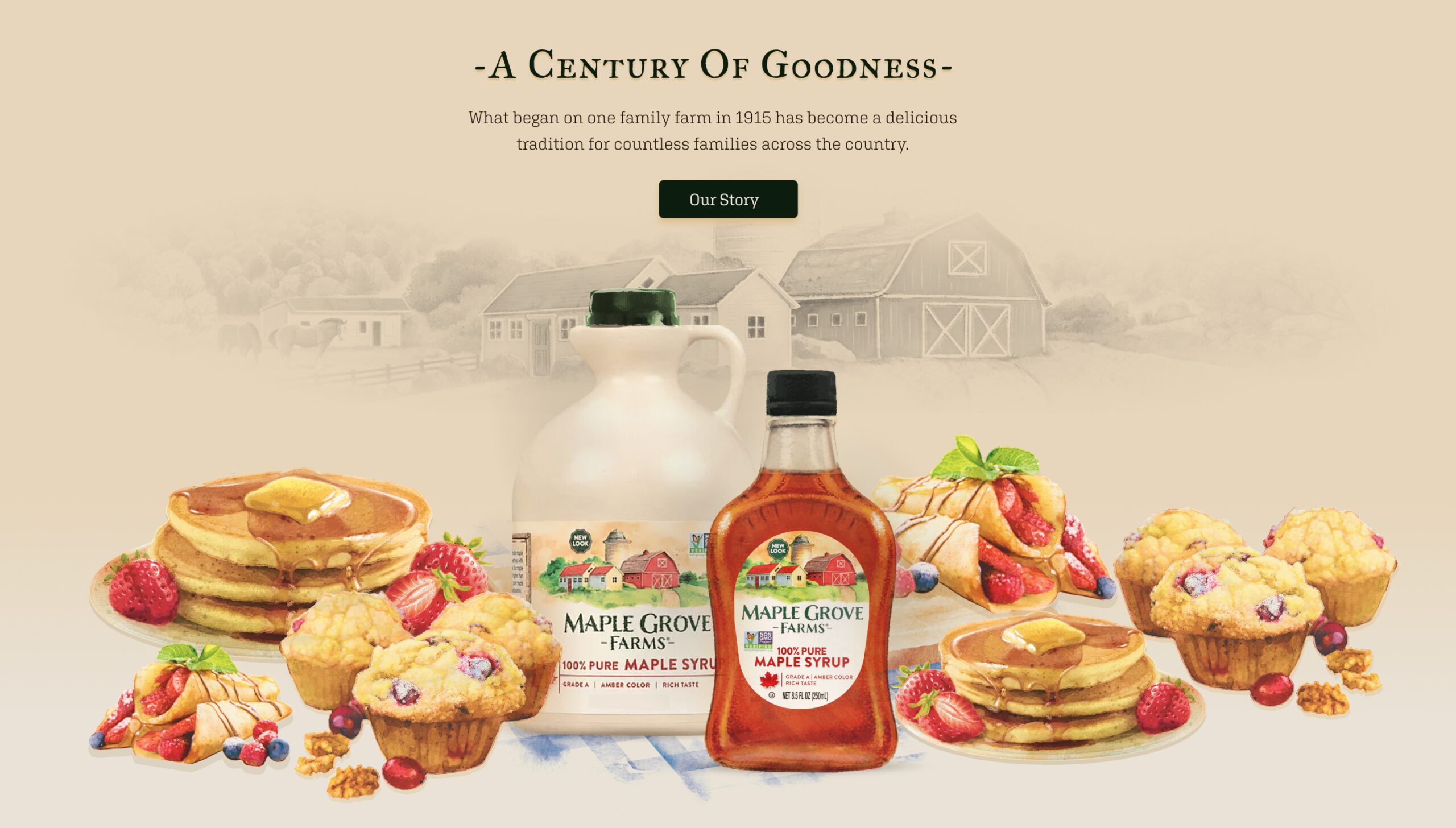
B&G Foods has more than 50 brands of household-name packaged and canned foods, including several maple syrup brands. They wanted a redesigned website for Maple Grove Farms Maple Syrup to support the new packaging’s look and feel that incorporated the new watercolor logo and labels depicting the original Maple Grove Farm in Vermont.

A storybook syrup
Working closely with the Maple Grove Farms brand manager and B&G Foods Ecommerce Team, Yalo leveraged the new motif into a storybook look and feel with animation for the new branding. The design was incorporated into all the product pages, recipes, history of the brand, sustainability, museum page, and a store locator for consumers.

Results so good you can taste it
See for yourself at the Maple Grove Farms website.
Yalo delivered design wireframes, built out the Maple Grove Farms Maple Syrup site on WordPress CMS, and tested and deployed the new site on time and on budget. In the end, Yalo designed and created more than 70 total pages that elevated the brand site to reflect B&G Foods’ wishes to present a high-quality product and polished, cohesive brand site. Our UI/UX designers and creative team outdid themselves on this sweet website project and we’re delighted at the tasty results. Pancakes, please?
Curious about what the Digital Yalo team can do for you and your creative marketing needs? Scroll down a bit and contact us to get a conversation started. You can also view more of our recent creative design work in several mediums to imagine our capabilities for whatever your needs might be.